 Printables
 MX Switch Calculator – Standard & Plus
di yagoob
- 5 Mi piace
- 8 Download
- 98 Visualizzazioni
I file si scaricano dalla piattaforma originale. makeIt. non ospita né ricarica modelli di terzi.
Dove trovarlo
- Printables Vedi prezzo ApriPrintables
Informazioni su questo modello
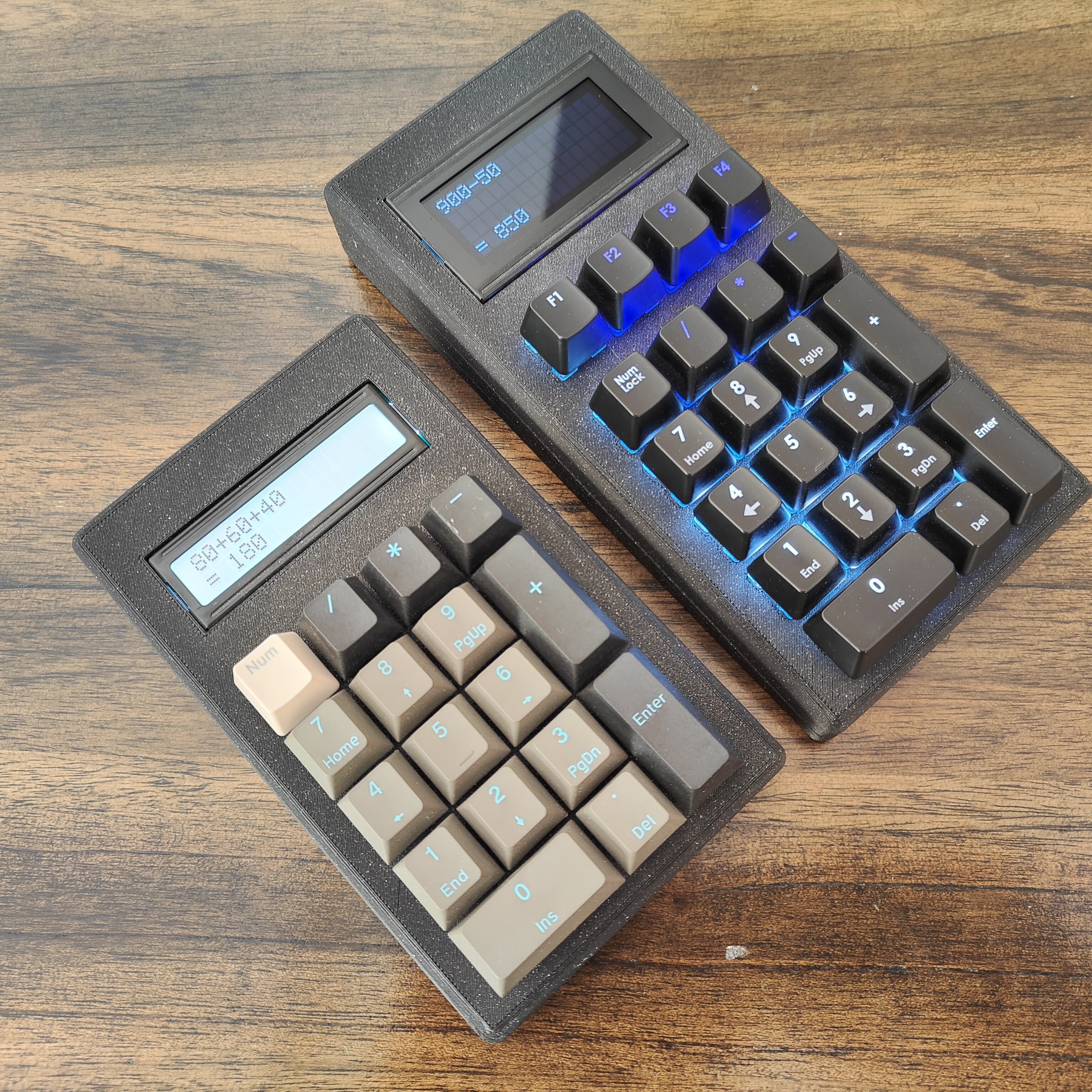
MX Switch Calculator – Standard & Plus Summary The MX Switch Calculator is a portable calculator built with MX-compatible mechanical switches and powered by an RP2040-based development board supported by CircuitPython. It is a fun project for mechanical-keyboard enthusiasts. The project currently includes two versions: Standard Version A lightweight and portable version featuring: Portable lightweight design 1602 I2C LCD Beginner-friendly assembly Plus Version An enhanced desktop-oriented version featuring: Larger 1604 I2C LCD display Four utility shortcut keys: Percentage calculation, percentage-difference calculation, customizable currency conversion in the firmware (default: USD to BHD), and clear. Independent power management for LCD and key backlighting LED key backlighting (optional) Parts Needed Shared Components Controller RP2040-based development board supported by CircuitPython (with the required GPIO pins exposed) Power System 3.7V Li-ion battery TP4056 USB-C Charging Module with Protection 5V Boost Converter Module 12 mm latching power switch with built-in LED JST Connectors / Plugs Input Components Your preferred MX-compatible mechanical switches Keycaps LCD Components I2C LCD Backpack Adapter Hardware M3 screws Wiring Solder Standard Version 1602 16x2 HD44780 LCD Display Plus Version 1604 16x4 HD44780 LCD Display Optional LED Backlight Circuit 3mm LEDs for Key Backlighting Resistors 2N2222 transistor Dedicated boost converter module for the LED circuit Transparent legend keycaps Wiring LCD (I2C) · SDA → GP0 · SCL → GP1 · VCC → 5V (from boost converter) · GND → GND Switches All switch inputs connect directly to available GPIO pins on the controller board and are wired to VCC. The following GPIO pins are used for button inputs: (GP2, GP3, GP4, GP5, GP6, GP7, GP8, GP9, GP10, GP11, GP12, GP13, GP15, GP16, GP17, GP18, GP19, GP20, GP21, GP22, GP26) GPIO assignments are defined in the firmware and can be adjusted to match the selected RP2040-based board and enclosure layout. Power System 3.7V Battery → TP4056 IN+ / IN- TP4056 OUT+ → switch → Boost Converter IN+ TP4056 OUT- → Boost Converter IN- Boost 5V OUT → System VCC Switch LED → 3.3 V → GND (make sure it has a built-in resistor, or add an external resistor) GND → Common ground (all modules) Optional LED Circuit (Plus Version) GP14 → Base of 2N2222 (through resistor) Collector → LED cathodes Emitter → GND LED anodes → 5V via resistors Powered by dedicated boost converter rail Firmware Install the correct CircuitPython build for your RP2040-based board, then download the required LCD library from the GitHub link below. Choose either calculator.py or calculator-plus.py, rename it to main.py, and copy it to the device root directory. Two firmware versions are provided: Standard Version calculator.py · Standard calculator functionality · Single press CLS = Backspace · Double press CLS = Clear all · LCD power management Plus Version calculator-plus.py · Backspace (NumLock) and clear functions (F1) · Percentage calculation (F2) · Percentage difference calculation (F3) · Currency conversion (F4) — customizable via code · LED + LCD power management Step-by-Step Installation Install the correct CircuitPython build for your RP2040-based board Download and copy the required LCD library to the /lib folder: Link https://github.com/dhalbert/CircuitPython_LCD/tree/main/lcd Rename the selected Python file (calculator.py or calculator-plus.py) to main.py Copy main.py to the device root directory Done. TIPS · Both the LCD and switches are designed for a snug fit inside the enclosure. A small amount of hot glue can be used to secure the LCD if needed. · First wire the LCD and switches to the controller board, install the firmware, and fully test the calculator before adding the battery and charging circuit. · The enclosure exposes only a single external port for battery charging. The charging module can be secured using hot glue. · The controller board is intended to remain inside the enclosure after flashing because no further interaction is normally required.
Tag
Dettagli
- Licenza
- Creative Commons — Attribution — Noncommercial — Share Alike
- Pubblicato
- Aug 23, 2026
- Fonte
- Printables
- Ultima sincronizzazione
- 56d ago
Rispetta il designer. La ridistribuzione non autorizzata dei file è vietata. Hai trovato una copia pirata? Leggi l'avviso